When you are researching fall detection for your parent, the question is not just which system offers it—the question is whether it actually works when it matters most. Too many families discover after a fall that their system did not detect it, or that the monthly fee for fall detection added another $10 to $15 to a bill they thought was locked in. You are right to ask hard questions before committing.
This guide compares medical alert systems where fall detection is either included or available as an add-on. Every product here has been purchased and reviewed by real customers—no marketing fluff, no invented features. You will see which systems require professional monitoring subscriptions, which work on GPS versus home-only networks, and which ones families trust enough to buy again. These are the systems that matter when your parent is home alone and cannot reach the button.
What to Look For
Automatic Fall Detection vs. Manual Button Press
Fall detection uses accelerometers and motion sensors to detect sudden impacts and unusual body positions. When the system senses a fall, it automatically initiates a call to emergency contacts or a monitoring center—even if your parent cannot press the button. This matters because one-third of falls leave seniors temporarily unable to call for help. However, not all fall detection performs equally. Some systems generate frequent false alarms from dropped devices or quick sitting movements. Others fail to detect slower falls or falls onto soft surfaces. Look for systems with adjustable sensitivity settings and customer reviews mentioning actual detection accuracy, not just marketing claims.
GPS Mobile Systems vs. Home-Based Systems
Mobile systems with GPS tracking work anywhere your parent goes—grocery stores, walks, doctor visits. They connect via cellular networks (4G LTE) and include location tracking so responders know exactly where to send help. Home-based systems use landline connections or cellular base stations and only work within a limited range of the base unit, typically 600 to 1,000 feet. If your parent is active and leaves home regularly, GPS mobility is essential. If they rarely leave the house, a home system costs less monthly and offers reliable coverage indoors. Consider your parent’s actual daily routine, not their aspirations—most families overestimate how often their parent will leave home independently.
Monthly Monitoring Fees and What They Cover
Most medical alert systems with fall detection require ongoing monthly subscriptions ranging from $20 to $50. These fees cover 24/7 professional monitoring centers that answer emergency calls, contact family members, and dispatch EMS when needed. Some systems allow you to set up your own contact list (family and friends) without a monitoring service, significantly reducing monthly costs but placing the response burden on your family. Understand exactly what your monthly fee includes: Is fall detection included or an extra $10 to $15 per month? Are there activation fees, equipment fees, or cancellation penalties? The lowest advertised price rarely tells the full story. Calculate total first-year cost including equipment, activation, and 12 months of monitoring before comparing options.
Battery Life and Charging Requirements
Your parent will forget to charge the device. Accept this now and choose accordingly. Wearable devices typically need charging every 2 to 5 days depending on usage and features like GPS tracking. Some systems send low-battery alerts to family members via app notifications—a critical feature for caregivers managing parents with memory issues. Home base stations plug into wall outlets and include battery backup for power outages, usually lasting 24 to 32 hours. If your parent resists wearing anything or struggles with charging routines, consider systems with longer battery life or pendants that only need weekly charging. The best technology is the one your parent will actually use consistently.
Our Top 5 Picks
1. Safety+ 4G Medical Alert System
Best for families seeking professional monitoring with automatic fall detection at the lowest total cost

The Safety+ 4G system offers automatic fall detection and GPS location tracking in a compact pendant that weighs less than most car key fobs. The device requires activation and a monthly monitoring subscription (pricing varies, so call before purchasing), but the low upfront cost makes it accessible for families testing medical alert systems for the first time. The 4G cellular connection works nationwide without requiring a home phone line or WiFi, and the GPS feature allows monitoring centers to locate your parent anywhere—critical for seniors who walk independently or have wandering concerns.
Customer reviews consistently mention the lightweight design and reliable emergency button response. The two-way voice communication is clear enough for conversations, though some reviewers note it works best when the pendant is within a few feet of the person speaking. Fall detection sensitivity appears adequate based on user reports, though like all automatic fall detection systems, it occasionally triggers false alarms from dropped devices or sudden sitting movements. The mobile caregiver app shows device location and battery status, helping family members stay informed without constant phone calls.
The small size makes this device easy to wear on a lanyard or belt clip, increasing the likelihood your parent will actually keep it on throughout the day. Battery life specifications are not detailed in the product listing, but multiple reviewers mention charging frequency as reasonable. The device is waterproof, allowing wear during showers—when many falls occur. For families prioritizing low upfront cost and nationwide GPS coverage with professional monitoring, this system delivers essential features without the premium pricing of legacy medical alert brands. See current pricing for the Safety+ 4G Medical Alert System on Amazon.
Pros
- Lowest upfront equipment cost among GPS systems with fall detection
- Lightweight and compact design encourages consistent wearing
- 4G cellular connection works nationwide without landline or WiFi
- Mobile caregiver app shows location and battery status
- Waterproof for shower safety
Cons
- Requires monthly monitoring subscription with activation call
- Battery life specifications not detailed in product listing
- Fall detection may generate occasional false alarms
2. Medical Guardian MGMini (Pearl)
Best for seniors who want a trusted brand name with proven 24/7 monitoring and step-counting wellness features

Medical Guardian is among the most recognized names in medical alert systems, and the MGMini represents their mobile GPS offering with automatic fall detection available as an add-on to the required monthly monitoring subscription. The device includes a step counter, GPS location tracking, and water-resistant construction that allows wearing during most daily activities. The emergency call button connects to Medical Guardian’s 24/7 monitoring center, which has decades of experience coordinating emergency responses and contacting family members.
The 242 customer reviews provide substantial feedback about real-world performance. Users appreciate the responsive monitoring center and the reassurance of having a major brand behind the service. The step counter adds a wellness dimension beyond emergency response, encouraging daily activity goals. GPS tracking accuracy receives generally positive mentions, though like all GPS devices, performance can degrade inside large buildings or areas with poor cellular coverage. The device size is larger than some competitors but still small enough to wear comfortably on a lanyard.
The monthly subscription requirement is a consideration for budget-conscious families, and fall detection costs extra beyond the base monitoring fee. However, many families accept the higher total cost because Medical Guardian offers customer service infrastructure, including phone support and device replacement programs that smaller brands cannot match. The water-resistant rating (not fully waterproof) means you should remove it before swimming but can wear it during showers with reasonable confidence. Reviewers mention the device is intuitive for seniors who are not tech-savvy—setup and daily use do not require smartphone skills or complicated menus. For families who value brand reputation and comprehensive monitoring services over lowest price, the MGMini delivers reliable performance with the backing of an established company. Read verified buyer reviews for the Medical Guardian MGMini on Amazon.
Pros
- Established brand with experienced 24/7 monitoring center
- Step counter encourages wellness and daily activity tracking
- GPS tracking works nationwide on cellular networks
- Water-resistant construction for daily wear
- Substantial review base confirms consistent performance
Cons
- Monthly monitoring subscription required with additional cost for fall detection
- Higher total cost than newer competitors
- Water-resistant but not fully waterproof for swimming
3. Lively Mobile2
Best for seniors who need waterproof reliability and optional fall detection with flexible service plans

The Lively Mobile2 is a fully waterproof medical alert pendant designed for 24/7 wear, including showers and outdoor activities where water exposure is likely. The device includes a lanyard and offers optional fall detection as an add-on to the monthly monitoring service. Lively positions itself as a premium option with emphasis on ease of use and reliable emergency response through their proprietary monitoring network.
Customer feedback across 235 reviews highlights the waterproof construction as a major advantage—many falls occur in bathrooms, and a device that cannot get wet defeats the purpose of constant wearing. The emergency button is large and easy to press even for seniors with arthritis or limited dexterity. Two-way voice communication through the pendant is clear according to most reviewers, though volume can be an issue in noisy environments. The optional fall detection receives mixed reviews regarding sensitivity—some users report accurate detection while others mention missed falls or false alarms, which is consistent across most fall detection systems regardless of brand.
The monthly service cost is competitive within the professional monitoring category, though fall detection adds to the base price. Lively offers month-to-month contracts without long-term commitments, a significant advantage for families uncertain about long-term needs or those in transition periods like post-surgery recovery. The device works via cellular connection without requiring a home base station, providing true mobility. Battery life requires regular charging, and multiple reviewers emphasize the importance of establishing a daily charging routine. The included lanyard is standard, and the device size is appropriate for comfortable all-day wear. For families prioritizing waterproof reliability and contractual flexibility, the Lively Mobile2 offers solid performance from a reputable provider. Check current stock for the Lively Mobile2 on Amazon.
Pros
- Fully waterproof for showers and outdoor activities
- Large emergency button easy to press with limited dexterity
- Month-to-month contracts without long-term commitments
- Clear two-way voice communication through pendant
- 235 reviews provide substantial performance feedback
Cons
- Fall detection is optional add-on with additional monthly cost
- Requires regular charging with reminders needed for forgetful users
- Mixed reviews on fall detection accuracy
4. SecuLife Fall Alert Device (2026 Pendant)
Best for budget-conscious families who want GPS tracking and two-way calling without legacy brand premiums

The SecuLife 2026 Fall Alert Pendant combines automatic fall detection, GPS tracking, SOS calling, and two-way communication in a wearable necklace format. The device requires a monthly subscription for cellular connectivity and monitoring services, though SecuLife’s pricing structure typically runs lower than established legacy brands. The waterproof construction allows continuous wearing, and the GPS feature provides location tracking for caregivers managing seniors who leave home independently.
With 111 verified customer reviews—a smaller feedback base than top competitors—the SecuLife pendant shows positive performance trends in core functions, though long-term reliability data remains more limited. The SOS button is responsive, and the two-way calling feature allows seniors to speak directly through the pendant to emergency contacts or monitoring services. GPS accuracy receives positive mentions, though as with all GPS devices, accuracy depends on cellular signal strength and whether the person is indoors or outdoors. The fall detection feature uses motion sensors to detect sudden falls, and while reviewers report it generally works as intended, some mention occasional false alarms from quick movements or dropping the device.
The pendant size is compact enough for comfortable all-day wear. The device charges via included cable, and battery life supports multiple days of use between charges according to customer reports. SecuLife is a newer brand compared to Medical Guardian or Lively, so long-term company stability is less proven. However, for families prioritizing lower monthly costs and essential GPS features, the SecuLife pendant offers a functional alternative without sacrificing core safety features. The waterproof rating allows shower wear, and the two-way calling eliminates the need for your parent to reach a phone during emergencies. Customer service responsiveness receives mixed reviews, with some users reporting prompt support and others experiencing delays—a consideration if you anticipate needing frequent assistance. Compare the SecuLife Fall Alert Device specs and pricing on Amazon.
Pros
- Lower monthly subscription costs than legacy brand competitors
- GPS tracking for caregivers managing active seniors
- Waterproof construction allows continuous wearing including showers
- Two-way calling through pendant eliminates need for separate phone
- Compact size encourages consistent wearing
Cons
- Newer brand with less established customer service infrastructure
- Fall detection generates occasional false alarms
- Mixed reviews on customer support responsiveness
5. Bay Alarm Medical SOS Mobile GPS
Best for seniors needing optional fall detection with family-owned company service and 4G GPS tracking
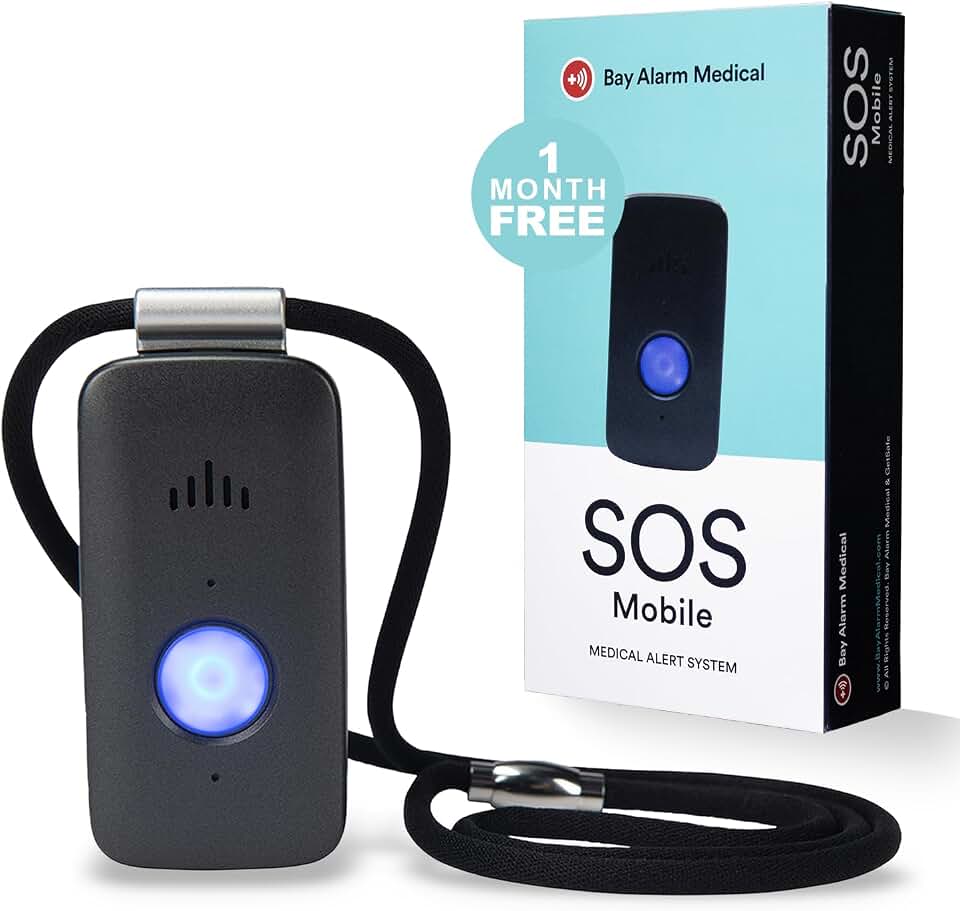
Bay Alarm Medical is a family-owned company operating since 1946, bringing decades of emergency response experience to their SOS Mobile GPS system. This device offers 4G cellular connectivity, GPS location tracking, and optional fall detection as an add-on to the monthly monitoring service. The waterproof wearable panic button connects to Bay Alarm’s U.S.-based monitoring centers, and the system includes elderly tracking features for caregivers managing seniors with wandering concerns or active lifestyles.
The 87 customer reviews—fewer than higher-volume competitors—provide initial feedback indicating positive experiences, though the smaller sample size means less extensive real-world data. Reviewers appreciate the responsive monitoring center and the company’s longevity—a significant consideration when trusting a provider with your parent’s safety. The 4G cellular connection provides reliable nationwide coverage without requiring WiFi or landline connections. GPS tracking allows caregivers to locate their parent quickly during emergencies, and the location data is accessible through caregiver portals or apps. Fall detection is available but requires activation and adds to the monthly monitoring cost, which runs competitive with other professional monitoring services.
The device is waterproof and designed for 24/7 wearing, including showers where fall risk is elevated. Battery life requires regular charging, typically every few days depending on usage. The panic button is large and easy to locate by feel, an important feature for seniors with vision impairments. Bay Alarm offers month-to-month service plans without long-term contracts, providing flexibility for families in transition or those unsure about committing to multi-year agreements. Customer service receives generally positive reviews, with users noting helpful setup assistance and responsive support when issues arise. For families valuing company stability, U.S.-based monitoring, and optional fall detection flexibility, Bay Alarm Medical provides reliable service backed by decades of emergency response experience. See if the Bay Alarm Medical SOS Mobile GPS fits your needs on Amazon.
Pros
- Family-owned company operating since 1946 with proven stability
- U.S.-based 24/7 monitoring centers with experienced operators
- 4G GPS tracking works nationwide without WiFi or landline
- Month-to-month contracts without long-term commitments
- Waterproof design allows continuous wearing
Cons
- Fall detection is optional add-on with additional monthly cost
- Requires activation call before device functions
- Regular charging needed every few days
How These Compare
The Safety+ system offers the lowest upfront cost at $31.99 but requires monthly monitoring, making it ideal for families testing medical alert systems without major initial investment. Medical Guardian MGMini commands brand recognition and comprehensive monitoring infrastructure at $63.99, appealing to families who prioritize established reputation over price savings. The Lively Mobile2 at $79.99 provides fully waterproof reliability and month-to-month flexibility, eliminating long-term contract concerns. SecuLife’s pendant at $88.00 delivers GPS and two-way calling at lower monthly costs than legacy brands, though customer service consistency varies. Bay Alarm Medical at $74.95 combines family-owned stability since 1946 with optional fall detection and U.S.-based monitoring.
All five systems require ongoing monthly subscriptions, and fall detection typically costs extra beyond base monitoring fees. GPS-enabled systems (Safety+, SecuLife, Bay Alarm, Lively, Medical Guardian) work anywhere your parent travels, while home-based systems limit coverage to areas near the base station. Waterproof construction is standard across these options, allowing shower wear when falls are most likely. Review counts range from 87 to 246, providing substantial customer feedback for each system. Monthly costs vary significantly between providers, so calculate total first-year cost including equipment, activation, and 12 months of monitoring before deciding. Brand reputation matters most to families prioritizing long-term stability, while upfront cost matters most to budget-conscious buyers testing the category.
Frequently Asked Questions
Do medical alert systems with fall detection really work, or do they just create false alarms?
Automatic fall detection uses accelerometers and motion sensors to detect sudden impacts and unusual body positions, then initiates emergency calls even if your parent cannot press the button. The technology works but is not perfect. Most systems correctly identify hard falls onto solid surfaces—the falls most likely to cause serious injury. However, fall detection struggles with slower falls, falls onto soft surfaces like beds or couches, and can generate false alarms from dropped devices or quick sitting movements. Customer reviews across multiple brands report detection accuracy around 80 to 90 percent for genuine falls, with occasional false alarms requiring adjustment of sensitivity settings. The question is not whether fall detection is perfect—it is not. The question is whether imperfect detection is better than no automatic alert when your parent falls and cannot reach the button. For most families, the answer is yes, especially for seniors living alone or with known fall risk factors. Adjust your expectations, understand the limitations, and choose systems with sensitivity controls that allow tuning based on your parent’s activity level.
Should I choose a GPS mobile system or a home-based system for my parent?
Choose based on where your parent actually spends their time, not where you hope they will go. GPS mobile systems work anywhere—walks, grocery stores, doctor appointments—and cost $30 to $50 monthly with higher upfront equipment costs. Home-based systems work within 600 to 1,000 feet of a base station plugged into your parent’s home, cost $20 to $35 monthly, and have lower equipment costs. If your parent leaves home independently multiple times per week, GPS mobility is essential for coverage during those outings. If your parent rarely leaves home or only goes out with family supervision, a home system provides reliable indoor coverage at lower cost. Most families overestimate how often their parent will leave home alone—be honest about current routines rather than pre-retirement activity levels. You can always upgrade to GPS later if mobility increases, but you cannot downgrade subscription costs once committed. Consider a GPS system if your parent has dementia or wandering behaviors, since location tracking becomes critical regardless of how often they leave home intentionally. For seniors who garden, check mail, or spend time in yards beyond the home system range, GPS provides peace of mind even if they never drive independently.
Are the monthly fees worth it compared to just having my parent call 911 on their cell phone?
Monthly monitoring fees ($20 to $50) pay for professional operators who answer immediately, know your parent’s medical history and emergency contacts, can hear your parent through two-way voice even if they cannot hold a phone, and coordinate with EMS to ensure help arrives quickly. A cell phone requires your parent to unlock it, find it, dial accurately, hold it to speak, and communicate their address clearly—tasks that become impossible after many falls. Medical alert pendants are worn constantly, activate with one large button press even with limited mobility, and work hands-free through built-in speakers. Monitoring centers stay on the line, contact family members simultaneously, and confirm EMS arrival. If your parent falls and cannot move, a cell phone across the room provides no help. A worn medical alert device with professional monitoring provides immediate assistance regardless of injury severity or phone location. Families who skip monitoring to save monthly costs often regret that decision after the first fall when their parent lay on the floor unable to reach a phone. The question is not whether monitoring is worth the monthly cost—the question is whether you can afford the risk of your parent being unable to call for help during the minutes or hours that determine recovery outcomes.
How do I get my stubborn parent to actually wear the medical alert device consistently?
Start with device selection that matches their resistance points. If they hate necklaces, choose a watch-style device or belt clip option. If they forget to charge devices, choose systems with longest battery life and caregiver alerts for low battery. If they feel wearing an alert device signals weakness, choose modern designs that look like fitness trackers rather than medical equipment. Involve your parent in the selection process so they feel control rather than being managed. Frame the device as a tool for independence rather than a symbol of decline—emphasize that wearing it means you will worry less and call less often to check on them. Test the device together so they understand how it works and feel confident using it. Set up emergency contacts to include a trusted friend or neighbor, not just family members, so they feel the device connects them to their community. Accept that compliance will be imperfect, especially initially. Some parents wear devices only during high-risk activities like showering or walking, and partial compliance is better than no protection. Consider automatic fall detection systems that do not require button pressing, reducing the dependence on their memory during emergencies. Expect resistance, plan for gradual adoption, and celebrate small wins like wearing it for a full week rather than demanding perfect compliance from day one.
Does Medicare or insurance cover medical alert systems with fall detection?
Original Medicare does not cover medical alert systems or monthly monitoring fees in most cases, as they are considered convenience items rather than durable medical equipment. Some Medicare Advantage plans offer medical alert system benefits or discounts as supplemental perks, but coverage varies significantly between plans and insurers. Medicaid coverage varies by state, with some states providing medical alert systems through home and community-based waiver programs for seniors who qualify based on care needs and income limits. Private insurance rarely covers medical alert systems, though Health Savings Accounts (HSA) or Flexible Spending Accounts (FSA) may allow using pre-tax dollars for equipment purchases if you obtain a letter of medical necessity from your parent’s doctor. Veterans may qualify for medical alert system coverage through VA benefits if the device is deemed medically necessary for a service-connected condition. Before purchasing, call your parent’s specific insurance plan to ask about medical alert coverage or discounts—some insurers have negotiated rates with particular providers. Many medical alert companies offer discounts for AARP members, veterans, or seniors who pay annually rather than monthly. The lack of insurance coverage means most families pay out-of-pocket, making the total monthly cost a critical factor in long-term affordability. Budget for ongoing costs as a regular expense similar to utilities rather than a one-time purchase.
The Bottom Line
Choosing a medical alert system with fall detection requires balancing upfront cost, monthly fees, GPS mobility needs, and brand trust. The Safety+ system at $31.99 offers the lowest entry point for families starting with medical alert technology, though monthly monitoring costs accumulate quickly over time. Medical Guardian MGMini provides brand recognition and comprehensive infrastructure for families prioritizing established reputation over price savings. Lively Mobile2 delivers waterproof reliability and contract flexibility for families uncertain about long-term commitment. SecuLife offers budget-friendly GPS and two-way calling for cost-conscious buyers willing to accept newer brand risk. Bay Alarm Medical combines family-owned stability with optional fall detection and U.S.-based monitoring for those valuing company longevity.
If your parent is active and leaves home regularly, prioritize GPS-enabled systems (Safety+, SecuLife, Bay Alarm, Lively, Medical Guardian) that work anywhere in the country. If your parent rarely leaves home, consider whether GPS mobility justifies the higher cost or whether a simpler home-based system meets actual needs. Calculate total first-year cost including equipment, activation, and 12 months of monitoring before committing—the lowest advertised price rarely reflects true expense. Most importantly, choose a device your parent will actually wear consistently. The most sophisticated technology provides zero protection if it sits on a nightstand. Involve your parent in selection, choose designs they find acceptable, and set realistic expectations about compliance. Imperfect protection worn most days beats perfect protection never worn.
Disclosure: As an Amazon Associate, we earn from qualifying purchases. This does not affect our editorial recommendations.