When your parent lives alone, the fear of them falling and lying helpless for hours is constant. You imagine them unable to reach a phone, too disoriented to press a button, waiting in pain until someone happens to check in. This fear is not irrational. Automatic fall detection devices exist specifically to address this nightmare scenario—they sense when someone has fallen and immediately alert emergency contacts or monitoring services, even if the person cannot press a button.
The market has changed dramatically in the past few years. Today’s best fall detection devices combine automatic detection sensors with GPS tracking, two-way communication, and caregiver apps that let you monitor your parent’s safety from anywhere. Some require monthly monitoring fees while others operate independently. This guide reviews devices with proven fall detection technology and substantial customer feedback, focusing on accuracy, false alarm rates, and real-world reliability.
What to Look For
Automatic Detection vs. Manual Buttons
The single most important feature is automatic fall detection. Manual alert buttons only work if your parent is conscious, oriented, and able to press them. Automatic detection uses accelerometers and algorithms to recognize fall patterns—sudden drops, impacts, and prolonged immobility. Every device in this guide includes automatic detection, though accuracy varies. Customer reviews consistently mention that some devices trigger false alarms during normal activities like sitting down quickly, while others miss actual falls. No system is perfect, but the best devices balance sensitivity with reliability.
Monthly Fees and Hidden Costs
Most fall detection devices require ongoing monitoring subscriptions, typically ranging from $20 to $50 monthly. These fees cover emergency response centers that answer alerts 24/7, verify the emergency, and dispatch help. Some devices connect directly to 911, others route through monitoring services that contact your family first. A few devices operate without monthly fees, calling emergency contacts directly via cellular service. Calculate the true first-year cost: device price plus 12 months of fees. A $70 device with $30 monthly fees costs $430 in year one.
GPS Tracking and Location Services
For parents who still leave the house, GPS tracking is essential. If they fall outside or wander due to cognitive decline, responders need to know exactly where they are. GPS-enabled devices work nationwide via cellular networks. Some also include geofencing—you receive alerts if your parent leaves a defined safe zone. This feature matters most for dementia patients who may wander. Indoor location tracking is less precise, relying on WiFi positioning.
Battery Life and Charging Requirements
Daily charging creates risk. If your parent forgets to charge the device overnight, they are unprotected the next day. Look for devices with multi-day battery life. Smartwatch-style devices typically need daily charging due to screen power consumption. Pendant-style devices often last 3-5 days. Some customers report that parents with memory issues struggle with charging routines. Consider whether your parent can reliably manage the charging schedule, or whether you will need to visit regularly to ensure the device stays powered.
Our Top 5 Picks
1. Safety+ 4G Medical Alert System: Fall Detection, GPS Location, 24/7 Monitoring
Best for families wanting 24/7 professional monitoring with the lowest upfront cost

The Safety+ 4G system combines automatic fall detection with 24/7 professional monitoring at an extremely low entry price. At $31.99 for the device, this represents one of the most affordable ways to access professional emergency response services. The mobile caregiver app provides remote monitoring by letting you check device status and receive alerts from anywhere.
Customers with 246 reviews give this device a 3.8-star rating, which reflects a mixed experience. Many buyers appreciate the low upfront cost and reliable location tracking capabilities. The device is small and lightweight enough to wear comfortably as a pendant. Two-way voice communication allows your parent to speak directly with monitoring agents after a fall is detected.
However, this device requires activation and a monthly monitoring subscription to function. The product listing does not specify the monthly fee amount, which is a significant concern for budget planning. Several customer reviews mention confusion about activation requirements and ongoing costs. Some users report that fall detection sensitivity needs adjustment—either too many false alarms during normal movement or missed falls that seemed obvious. The monitoring service requires a phone call to activate, which adds friction to the setup process. For families who want professional monitoring at the lowest possible device cost and are comfortable with ongoing fees, this system offers substantial value, but clarify the total monthly cost before purchasing. See current pricing for the Safety+ 4G Medical Alert System on Amazon.
Pros
- Lowest upfront device cost at $31.99
- 24/7 professional monitoring service included
- GPS location tracking works nationwide
- Mobile caregiver app for remote monitoring
- Waterproof for shower use
Cons
- Monthly monitoring fee not disclosed in listing
- Requires activation phone call to begin service
- Some reviews report inconsistent fall detection accuracy
View Safety+ 4G Medical Alert System: Fall Detection on Amazon →
2. Lively Mobile2 – Medical Alert Device – 24/7 Emergency Help – Waterproof
Best for parents who want a nationally recognized brand with strong customer support

Lively has built a reputation as one of the more established medical alert companies, and the Mobile2 device reflects that experience. With 235 customer reviews and a 4.2-star rating, this device shows consistently positive feedback. The Mobile2 is designed as a mobile device that works anywhere in the United States, using cellular connectivity to reach Lively’s monitoring center. The device includes optional fall detection as an add-on feature, which is important to note—fall detection is not automatically included in the base device price.
The included lanyard makes it easy to wear the device as a pendant, keeping it accessible at all times. Two-way voice communication through the device allows your parent to speak with trained monitoring agents who can assess the situation and dispatch appropriate help. The monitoring center operates 24/7 with agents based in the United States.
Customers frequently praise Lively’s responsive customer service and straightforward activation process. The device setup is described as simple. The exact cost of the subscription and the additional cost for fall detection are not specified in the Amazon listing, which means you will need to contact Lively directly for complete pricing. Some reviews note that the device is larger than expected, though not uncomfortably so. The fully submersible construction means it can safely be worn during showers where many falls occur. For families who prioritize brand reputation and customer service quality over the absolute lowest price, Lively Mobile2 offers a reliable option. Read verified buyer reviews for the Lively Mobile2 on Amazon.
Pros
- Established company with 24/7 US-based monitoring
- Strong customer service reputation in reviews
- Fully waterproof and submersible design
- Two-way voice communication
- Includes lanyard for pendant wear
Cons
- Fall detection is optional add-on, not included in base price
- Monthly subscription cost not disclosed in listing
- Battery life varies significantly in customer reports
View Lively Mobile2 – Medical Alert Device – 24/7 Emergency Help – Waterproof on Amazon →
3. Medical Guardian MGMini | Medical Alert Device for Seniors
Best for parents who value a compact, lightweight design that encourages all-day wear

Medical Guardian is among the most frequently recommended medical alert brands by senior care organizations, and the MGMini represents their compact mobile solution. With 242 customer reviews and a 4.0-star rating, this device has substantial real-world feedback. The MGMini is specifically designed to be small and lightweight, addressing a common complaint about medical alert devices—that they are too bulky to wear comfortably all day. The device includes step counter functionality for basic activity monitoring.
The MGMini connects to Medical Guardian’s 24/7 monitoring center via cellular service, working anywhere in the United States without requiring a separate smartphone or WiFi connection. The device includes an emergency call button for manual alerts, and Medical Guardian offers fall detection as an available add-on feature. Customer reviews indicate that setup is straightforward and that the monitoring center responds quickly when the button is pressed. The two-way speaker allows your parent to communicate with monitoring agents directly through the device.
However, the product listing clearly states that monthly subscription is required for the device to function, and the subscription cost is not included in the $63.99 device price. Multiple customer reviews mention frustration with this pricing structure, feeling that the costs should be more prominently disclosed. Some reviews report that the device requires charging about twice weekly with normal use. The step counter feature is described as a nice addition but not particularly accurate. For families who want a device their parent will actually wear consistently due to its comfortable size, the MGMini is worth considering, but budget for the ongoing fees when making your decision. Check current stock for the Medical Guardian MGMini on Amazon.
Pros
- Compact and lightweight design encourages consistent wear
- GPS tracking works nationwide on cellular network
- Medical Guardian’s established monitoring network
- Water-resistant construction
- Includes step counter for activity tracking
Cons
- Monthly subscription required but cost not disclosed in listing
- Fall detection is add-on feature, not included in base device
- Water-resistant only, not fully waterproof for shower use
View Medical Guardian MGMini | Medical Alert Device for Seniors on Amazon →
4. SkyAngel911FD – 4G -Mobile Cellular – NO Monthly FEE
Best for families who want to avoid ongoing monthly fees with a one-time purchase

The SkyAngel911FD takes a fundamentally different approach from most medical alert devices—it eliminates monthly monitoring fees entirely. For $179.77, you purchase the device outright and it calls 911 directly when fall detection is triggered or when the emergency button is pressed. This one-time payment model appeals strongly to families concerned about indefinite subscription costs. With 166 customer reviews and a 4.0-star rating, the device has proven real-world use across multiple years.
The device operates on 4G cellular networks, meaning it works anywhere with cell coverage without requiring WiFi or a smartphone. Automatic fall detection is built into the device, and two-way voice communication allows your parent to speak directly with 911 operators through the device speaker. The device charges via a standard USB connection, and customer reviews suggest several days of operation between charges, though exact specifications are not provided in the listing.
The no-fee model has significant tradeoffs. When the device alerts, it calls 911 directly—there is no monitoring center to screen the call or verify whether it is a false alarm. This means every fall detection trigger results in a 911 call, which can be problematic if the device has sensitivity issues. Several customer reviews mention this concern, noting that repeated false alarms to 911 can create problems with local emergency services. The device can also be programmed to call emergency contacts before or instead of 911, but this requires those contacts to answer their phones immediately. Some reviews report difficulty with initial setup and programming. Location information relies on cellular tower triangulation rather than dedicated GPS, which provides less precise positioning for emergency responders. For families who strongly prefer to avoid monthly fees and whose parents are mentally alert enough to cancel false alarms verbally, this device offers genuine value. Compare the SkyAngel911FD specs and pricing on Amazon.
Pros
- No monthly monitoring fees, one-time purchase only
- Automatic fall detection included in base price
- Waterproof design for continuous wear
- Two-way voice communication with 911 or contacts
- Works on 4G cellular network without WiFi needed
Cons
- No monitoring center to verify emergencies before 911 dispatch
- False alarms result in direct 911 calls
- GPS location accuracy not specified, relies on cellular triangulation
View SkyAngel911FD – 4G -Mobile Cellular – NO Monthly FEE on Amazon →
5. COCO Emergency Alert Smartwatch for Seniors – Fall Detection, SOS Call
Best for tech-comfortable seniors who want smartwatch features alongside emergency monitoring
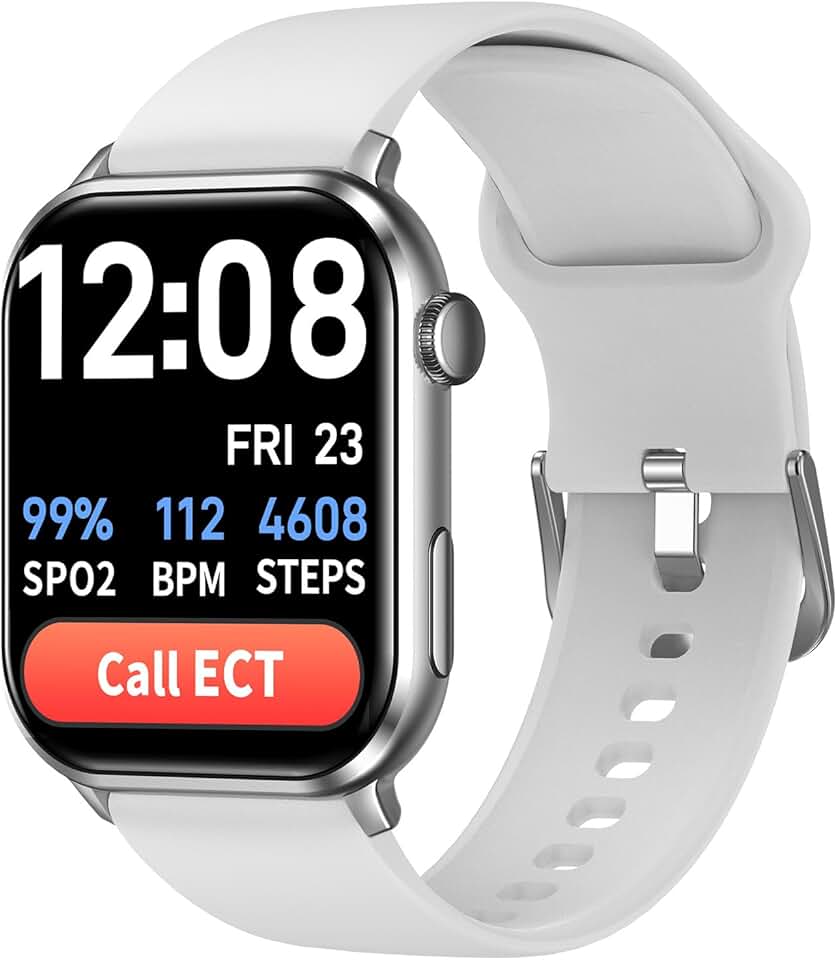
The COCO Emergency Alert Smartwatch combines traditional medical alert functionality with smartwatch health monitoring features. This device includes fall detection, SOS calling, heart rate monitoring, blood oxygen (SpO2) monitoring, medication reminders, and Bluetooth calling capabilities. The smartwatch format may appeal to seniors who are already comfortable with technology or who want a device that looks less like a medical alert system. With only 40 customer reviews and a 3.9-star rating, this device has significantly less real-world validation than other options reviewed here, which presents greater purchase risk.
The watch connects to a caregiver app that allows family members to monitor their parent’s location, receive alert notifications, and review health data. The fall detection feature automatically triggers alerts when a fall is detected, notifying designated emergency contacts through the app. The SOS button on the watch face provides manual alert capability. Bluetooth calling means your parent can make and receive phone calls directly through the watch when connected to their smartphone, which adds communication value beyond emergency situations.
The smartwatch format brings inherent challenges. The screen and multiple sensors drain power quickly, and customers report needing to charge the watch daily or every other day. The watch form factor is also more visible and tech-oriented, which some seniors find stigmatizing or confusing. Several reviews mention that setup is more complex than simpler pendant devices, requiring smartphone pairing and app configuration. The caregiver app approach means alerts go to family members rather than professional monitoring services, placing the response burden on family. Given the limited customer feedback and the need for family to serve as first responders, this device suits only specific situations: tech-comfortable seniors with engaged family members who can reliably answer alerts immediately. See if the COCO Emergency Alert Smartwatch fits your needs on Amazon.
Pros
- Smartwatch includes heart rate, SpO2, and medication reminders
- Caregiver app for family monitoring and alerts
- Bluetooth calling capability through the watch
- Fall detection alerts designated contacts
- Less medical-looking design than pendant devices
Cons
- Only 40 reviews means limited real-world validation
- Daily or every-other-day charging required
- Alerts go to family, no professional monitoring service
View COCO Emergency Alert Smartwatch for Seniors – Fall Detection on Amazon →
How These Compare
These five devices represent different approaches to fall detection. The Safety+ system offers the lowest upfront cost at $31.99 but requires monthly monitoring fees that are not disclosed. Lively Mobile2 and Medical Guardian MGMini both provide access to established 24/7 monitoring services with strong customer support, though both require monthly subscriptions and charge extra for fall detection features. The SkyAngel911FD stands alone as the only device with no monthly fees, calling 911 directly, but this creates false alarm management challenges and lacks GPS precision. The COCO smartwatch targets tech-comfortable seniors who want health tracking alongside emergency protection, but accepts shorter battery life and family-based response rather than professional monitoring.
For immediate response to falls, devices with professional monitoring (Safety+, Lively, Medical Guardian) provide the most reliable help. For cost-conscious families willing to accept some limitations, the SkyAngel no-fee model delivers basic protection. The smartwatch approach suits specific users but is not ideal for seniors with memory issues who will forget to charge it. Your choice depends primarily on whether you prefer professional monitoring with ongoing costs, or independent operation with one-time payment but more limited emergency response capabilities.
Frequently Asked Questions
Do fall detection devices work without monthly fees?
Yes, several fall detection devices operate without monthly monitoring fees by calling emergency contacts or 911 directly when a fall is detected. The SkyAngel911FD reviewed here is an example—you pay once for the device ($179.77) and it uses cellular service to make emergency calls without subscription charges. These devices work independently, using 4G or cellular networks to place calls. However, devices without monitoring services lack the screening layer that professional monitoring centers provide. Every fall detection trigger results in an immediate call, whether or not it is a genuine emergency. False alarms become more problematic because there is no one to verify the situation before emergency contacts or 911 are notified. You also lose features like activity monitoring and medication reminders that subscription services often include. The tradeoff is clear: lower lifetime cost in exchange for less sophisticated emergency response and potential false alarm issues. For families on fixed incomes where monthly fees of $20-50 are genuinely prohibitive, no-fee devices provide essential fall protection. For those who can afford monitoring services, the additional layer of professional response is typically worth the ongoing cost.
How accurate is automatic fall detection technology?
Automatic fall detection accuracy varies significantly between devices and depends heavily on the algorithms used and sensor quality. No fall detection system is 100% accurate—they all produce both false positives (detecting a fall when none occurred) and false negatives (missing actual falls). Customer reviews across all devices mention false alarms triggered by sitting down hard, dropping the device, or rapid movements. Conversely, some actual falls go undetected if the person catches themselves, falls slowly, or the impact is cushioned. The technology uses accelerometers to measure sudden changes in velocity and orientation, combined with impact sensors. Better devices use multi-factor algorithms that analyze fall patterns rather than just detecting drops. Most manufacturers do not publish specific accuracy rates, making independent verification difficult. In practice, families should expect occasional false alarms and understand that fall detection supplements rather than replaces other safety measures. The most important factor is that your parent wears the device consistently—an imperfect detector worn all the time is vastly better than a perfect detector sitting on the nightstand. Test the device when it arrives by simulating falls onto soft surfaces to understand its sensitivity, and work with customer support to adjust settings if false alarms become excessive.
Will Medicare or insurance pay for fall detection devices?
Medicare generally does not cover medical alert systems or fall detection devices because they are classified as preventive rather than treatment-related equipment. Traditional Medicare Parts A and B do not include coverage for these devices. Some Medicare Advantage plans may offer medical alert system benefits as supplemental coverage, but this varies by plan and is not standard. Medicaid coverage varies significantly by state—some states include personal emergency response systems in their waiver programs for seniors who qualify for home and community-based services, but eligibility requirements are strict. Private insurance rarely covers these devices. However, Health Savings Account (HSA) or Flexible Spending Account (FSA) funds can sometimes be used to purchase medical alert systems if you obtain a letter of medical necessity from your parent’s doctor. Some veterans may qualify for coverage through VA benefits if the device is deemed medically necessary. Tax deductions may be possible if your parent’s total medical expenses exceed the IRS threshold for itemized deductions. The most practical approach is to budget for fall detection devices as an out-of-pocket expense. Contact your specific insurance carrier to ask about coverage, but expect to pay for the device and monitoring service yourself. Some manufacturers offer payment plans or financial assistance programs for low-income seniors.
What happens when a fall is detected automatically?
The response sequence depends on whether your device connects to a professional monitoring service or calls contacts directly. For devices with monitoring services, the fall detection trigger immediately alerts the monitoring center. A trained agent attempts to communicate with your parent through the device’s two-way speaker, asking if they need help. If your parent responds that they are fine, the agent may log the incident but take no further action. If your parent does not respond, seems confused, or confirms they need help, the agent follows the emergency protocol—typically calling designated family contacts first, then dispatching emergency medical services if needed. The agent stays on the line until help arrives. For devices without monitoring services, the fall detection trigger automatically dials preprogrammed emergency contacts or 911. Your parent can speak through the device speaker to explain the situation, but there is no intermediary to verify whether help is truly needed. This means false alarms result in unnecessary emergency calls. Response time varies—professional monitoring centers typically respond within 30-60 seconds of alert receipt, while family member response depends on whether they answer their phones immediately. The device typically continues attempting to reach emergency contacts or monitoring services until someone responds or help arrives.
The Bottom Line
Choosing the right fall detection device means balancing cost, monitoring preferences, and your parent’s specific needs. If professional 24/7 monitoring is essential and budget allows, the Lively Mobile2 or Medical Guardian MGMini provide established monitoring networks and responsive customer service, though both require monthly subscriptions and charge extra for fall detection. For the lowest upfront investment with professional monitoring, Safety+ offers automatic fall detection starting at $31.99, though clarifying the monthly fee is essential before purchase. Families determined to avoid ongoing costs should consider the SkyAngel911FD at $179.77 with no monthly fees, accepting that it calls 911 directly without screening and may have false alarm challenges.
The most critical factor is consistent wear. A perfect device your parent refuses to wear provides zero protection. Choose a form factor your parent finds comfortable—whether pendant, watch, or wrist-worn device. Consider their cognitive status honestly: daily charging requirements work for alert seniors but fail for those with memory issues. Test the device when it arrives, practice using the emergency button, and establish clear protocols with family members about who responds to alerts. Fall detection technology is imperfect, but these devices provide genuine protection and have saved lives when seniors fall and cannot reach help. The best device is the one your parent will wear every day.
Disclosure: As an Amazon Associate, we earn from qualifying purchases. This does not affect our editorial recommendations.