When your parent needs fall detection but your budget is firmly capped at $100, the choices feel overwhelming—and the fear of choosing wrong can paralyze you. You are balancing genuine safety needs against fixed income realities, wondering if affordable devices can truly work when it matters most. That tension between what you wish you could afford and what you can actually spend is something many adult children face.
The truth about fall alert systems under $100 requires honesty: you will make tradeoffs. Devices at this price point offer either basic caregiver paging with no monthly fees, or feature-rich cellular systems that require ongoing subscriptions. Neither approach is inherently better—they serve different needs and living situations. This guide examines what actually exists below $100, which features you can realistically expect, and where those inevitable compromises show up in daily use.
What to Look For
Understanding the Two Categories Under $100
Fall alert systems under $100 split into two distinct categories, and understanding this division shapes every other decision. Simple caregiver pagers ($20-$50) work entirely within your home, connecting a wearable button to a receiver you carry. When pressed, they alert you directly with no outside monitoring, no cellular connection, and no monthly fees ever. Cellular-connected devices ($60-$90) offer GPS tracking and can contact emergency services or family members anywhere, but nearly all require monthly subscriptions that start after an initial trial period. The device cost is just your entry point—the real question is whether you are comfortable being the only responder, or whether you need professional monitoring and outside connectivity.
Monthly Fees: The Cost That Continues
Most cellular fall alert devices under $100 prominently advertise no monthly fees, but this claim requires careful reading. What they typically offer is a trial period—often 30 to 90 days—with basic functionality, after which monthly fees ranging from $20 to $40 activate for continued GPS tracking, fall detection features, or access to monitoring centers. Some devices become entirely non-functional without the subscription, while others revert to basic SOS calling only. Before purchasing any cellular device, contact the manufacturer directly to confirm exactly what stops working when the trial ends and what the ongoing cost will be. For truly no-fee options, you are limited to caregiver pagers that work only within your home.
Fall Detection vs. Fall Alert: Know the Difference
The term fall detection means the device automatically senses a fall and sends an alert without the wearer pressing anything. Fall alert simply means the person can press a button after falling to call for help. Automatic fall detection at this price point is uncommon, less reliable than premium systems, and often requires the paid subscription tier. If your parent has cognitive issues or might be unconscious after a fall, automatic detection becomes critical—but achieving truly reliable automatic detection typically requires spending beyond $100 and accepting monthly fees. Most devices under $100 are manual alert systems, which work only if your parent remains conscious and able to press the button.
Range Limitations and Living Situation
Caregiver pagers list impressive range specifications—often 500 to 1,000 feet—but these numbers assume perfect conditions with no walls or interference. In actual homes with multiple rooms, WiFi routers, and appliances, effective range drops significantly. If your parent lives in a two-story home or spends time in a basement or garage, test the range thoroughly during the return window. Cellular devices eliminate this concern entirely since they work anywhere with cell coverage, but they introduce the subscription cost question. Your parent’s living situation—size of home, whether they go outside, proximity to you as the caregiver—determines which limitation matters more.
Our Top 5 Picks
1. CallToU Wireless Caregiver Pager Smart Call System 2 SOS Call Buttons/Transmitters 2 Receivers
Best for families who can respond immediately and need zero ongoing costs

This system earns the top position by delivering exactly what it promises with no hidden costs or subscription surprises. You get two wearable call buttons and two plug-in receivers for under $40, and nothing stops working after a trial period because there is no trial period—this is purely a direct alert system between your parent and you. When your parent presses the button worn as a necklace or bracelet, both receivers chime and flash immediately, alerting you within the home or nearby area. Over 7,000 reviews provide substantial feedback about what works and what frustrates users, giving you realistic expectations before purchase.
The range specification of 500 feet requires context. In open outdoor spaces, the system performs as advertised. Inside typical homes with walls and WiFi interference, effective range drops to 100-200 feet for reliable signal—still adequate for most single-story homes or apartments where the caregiver lives with or very near the person needing assistance. The receivers plug directly into wall outlets and offer adjustable volume and light alerts, helpful when you are in another room or sleeping. The buttons are waterproof, meaning your parent can wear them in the shower where many falls occur.
What this system cannot do is equally important to understand. It does not contact anyone outside your home. It does not track location. It does not detect falls automatically. If you are at work, running errands, or sleeping so deeply you miss the alert, no backup system activates. This works for situations where the caregiver is nearly always home or where multiple family members share caregiving duties and can each carry a receiver. It fails entirely for seniors living alone without nearby family. The trade-off is absolute simplicity and zero monthly fees—you pay once and the system works indefinitely without subscriptions, cellular plans, or monitoring contracts. See current pricing for the CallToU Wireless Caregiver Pager Smart Call System on Amazon.
Pros
- No monthly fees ever—one-time purchase with no subscriptions required
- Substantial 7,089 customer reviews provide reliable performance expectations
- Two transmitter buttons and two receivers included for multi-room or multi-caregiver setups
- Waterproof buttons can be worn in shower
- Adjustable volume and visual alerts on receivers help ensure you notice the call
Cons
- Only alerts people within range—no outside emergency services or distant family notification
- Actual indoor range significantly less than 500-foot specification due to walls and interference
- No automatic fall detection—parent must be conscious and able to press button
2. FullHouse Wireless Call Button 1000+ Feet, SOS Alert Nurse Calling System
Best for the absolute tightest budgets where in-home alerting is sufficient
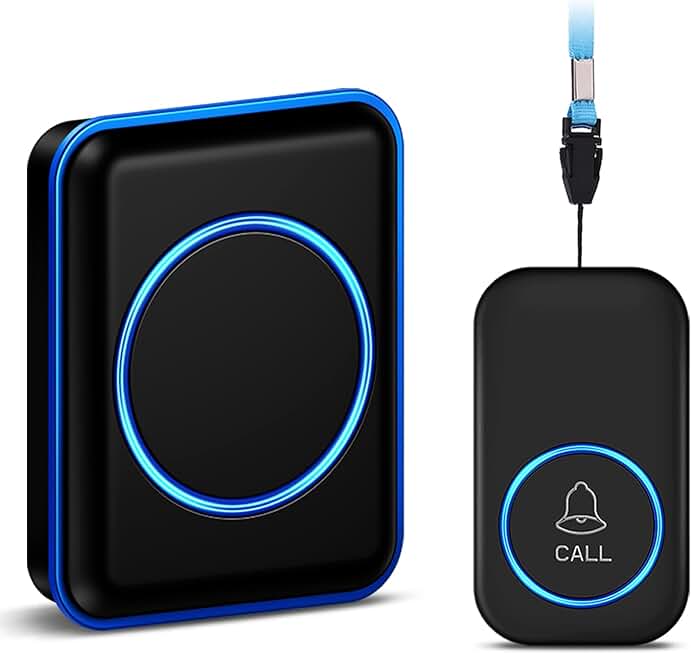
At just under $20, this represents the lowest-cost entry point for any alert system, making it accessible even when budgets are severely constrained. The system includes one wearable SOS button and one plug-in receiver, covering the basic need—your parent can press for help and you hear it immediately within the home. With 714 reviews and a 4.7-star rating, this device offers basic functionality at a price that removes financial barriers, though the limited review count means less extensive real-world testing than more established alternatives.
The advertised 1,000-foot range faces the same real-world constraints as all wireless systems at this price. Actual indoor performance typically delivers 150-200 feet through standard home construction, adequate for apartments or small single-story homes but insufficient for larger properties or multiple floors. The button carries water resistance to protect against splashing, though the manufacturer specifications should be verified for shower use. For seniors who primarily need coverage in living areas and bedrooms rather than full bathroom submersion protection, this may prove acceptable given the cost savings.
What separates this from slightly more expensive options is the single receiver limitation. You cannot easily add additional receivers for different rooms or multiple caregivers without purchasing entirely separate systems. If you sleep on a different floor or spend time in a detached garage or yard, you will miss the alert. The system also lacks the visual alert options found on pricier models—it relies primarily on audio chimes. However, for adult children living in the same small home with an aging parent, or for situations where the senior needs basic help summoning but not emergency response, this provides functional alerting at the lowest possible cost with no monthly fees. Read verified buyer reviews for the FullHouse Wireless Call Button on Amazon.
Pros
- Lowest price point in the category at under $20
- No monthly fees or subscriptions—one-time purchase
- Strong 4.7-star rating demonstrates reliable basic function
- Water resistance protects against splashing
Cons
- Only 714 reviews provide less extensive real-world testing than alternatives with thousands of reviews
- Only one receiver limits coverage to single caregiver in one location
- Water resistance specifications should be verified for specific shower use requirements
- Audio-primary alerts may be missed if caregiver is in noisy environment
3. Smart Caregiver Pager System with 2 Call Buttons
Best for families wanting USA-based support for a no-subscription system

This system distinguishes itself not through technological superiority but through customer support infrastructure—a USA-based company with domestic customer service, which matters significantly when your 80-year-old parent has questions or needs help. With 3,716 reviews accumulated over years on the market, this represents one of the most established simple pager systems available. You get two wearable call buttons and one pager receiver that clips to your belt or pocket, providing mobility that plug-in receivers cannot match.
The wireless range follows the same pattern as competing devices—adequate within typical homes but not miraculous. Where this system particularly serves adult children is the wearable pager option for the caregiver. Rather than needing to stay near a plug-in receiver, you can move throughout your home, work in the yard, or go to the mailbox while still receiving alerts. The pager vibrates and beeps when activated, providing both tactile and audio notification that is harder to miss than stationary receivers alone. Two call buttons mean your parent can keep one at bedside and wear another during the day without constantly moving a single device.
The limitation remains identical to other caregiver pagers: this alerts only the person carrying the pager within range. If you leave the house, the system provides zero functionality. No GPS tracking, no cellular backup, no outside emergency contact. The device also requires replacing batteries in both the buttons and the pager, creating small ongoing costs and maintenance tasks that plug-in systems avoid. However, for caregivers who are consistently present but need to maintain mobility throughout their daily routine, the wearable pager solves a practical problem that stationary receivers create. The established company presence and domestic support provide reassurance when purchasing for aging parents who may need assistance with the technology itself. Check current stock for the Smart Caregiver Pager System on Amazon.
Pros
- USA-based company with domestic customer support
- Wearable pager receiver allows caregiver mobility throughout home and yard
- Two call buttons provide bedside and wearable options
- Established 3,716 review count demonstrates long market presence
Cons
- Requires battery replacements in both buttons and pager over time
- Wearable pager format means remembering to carry and charge device
- Range limitations identical to other home-based systems
View Smart Caregiver Pager System with 2 Call Buttons on Amazon →
4. Daytech Wi-Fi Wireless Caregiver Call Button with App Alert
Best for tech-comfortable families wanting smartphone notifications without subscriptions
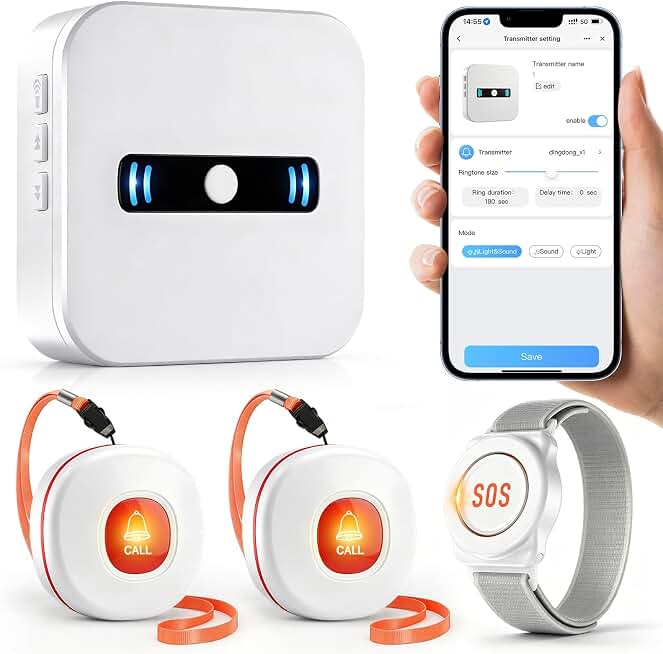
This system bridges the gap between simple pagers and cellular subscription services by adding WiFi connectivity and smartphone app alerts while maintaining the no-monthly-fee model. When your parent presses the call button, you receive notifications on your smartphone through the included app, allowing you to move beyond the physical range limitations of traditional pagers. This works only within your home WiFi network—not across town—but it means you can be in the basement, garage, or backyard and still receive alerts that would not reach a standard wireless receiver.
The package includes one wearable SOS alert watch, two wireless call buttons, and one plug-in receiver, providing multiple alert options and redundancy. The watch form factor appeals to seniors who dislike wearing necklaces or find bracelets uncomfortable. Setup requires connecting the system to your 2.4GHz WiFi network (it does not work with 5GHz networks that many newer routers use), which introduces a technical barrier absent from simpler pager systems. Adult children comfortable with basic smart home device setup typically complete this in 10-15 minutes, but seniors attempting solo installation may struggle without support.
The significant consideration appears in the review count—967 reviews provide reasonable initial feedback but substantially less extensive real-world testing than established pager systems. This newer WiFi-based approach has not yet accumulated the multi-year user testing that reveals edge cases and long-term reliability patterns. The app-based notification also introduces potential failure points: WiFi outages, smartphone battery death, app crashes, or notification setting errors can all prevent alerts from reaching you. Traditional pagers avoid these digital complications entirely. However, for families already comfortable with smart home technology who want expanded range within their home WiFi coverage area, this offers genuine additional flexibility without introducing monthly subscription costs. The higher price reflects the added technology, making it worth consideration if smartphone notifications solve a specific coverage problem in your home. Compare the Daytech Wi-Fi Wireless Caregiver Call Button specs and pricing on Amazon.
Pros
- Smartphone app notifications extend range throughout home WiFi coverage area
- No monthly subscription fees for app-based alerts
- Multiple devices included: watch, two buttons, and traditional receiver
- Watch form factor provides alternative to necklace or bracelet styles
Cons
- Only 967 reviews means less extensive real-world reliability data than systems with 5,000+ reviews
- Requires 2.4GHz WiFi network (not compatible with 5GHz)
- Setup complexity higher than simple pagers
- App and WiFi dependence creates additional potential failure points
View Daytech Wi-Fi Wireless Caregiver Call Button with App Alert on Amazon →
5. CallToU Caregiver Pager Wireless Call Button 1 Plugin Receiver 1 Waterproof Transmitter
Best starter system for testing whether in-home paging meets your needs

This stripped-down version of the higher-ranked CallToU system provides the absolute minimum—one button, one receiver—at the lowest price point, making it ideal for cautious buyers unsure whether in-home paging will work for their situation. With 5,200 reviews, this single-device configuration has been extensively tested in real homes, providing confidence that the basic functionality works reliably. The waterproof transmitter button and plug-in receiver cover the fundamental need: your parent presses for help, you hear it if you are home and within range.
The 500-foot range specification faces identical real-world limitations as other wireless systems, delivering 100-200 feet in typical indoor environments. What distinguishes this configuration is its utility as a trial system. For under $20, you can test whether your parent will actually wear and use an alert button, whether the range covers your specific home layout, and whether you reliably hear and respond to alerts. If the system works for your situation, you can add additional receivers or buttons later. If you discover you need cellular connectivity or professional monitoring, you have invested minimally in learning that lesson.
The single receiver creates obvious coverage gaps. If you are upstairs, outside, or in a distant room, you may miss the alert entirely. No visual indicators supplement the audio chime, making it easier to overlook if you are in a noisy environment or wearing headphones. However, this limitation matters less than it might seem for its intended use case—validating the concept before committing to more expensive solutions. Adult children uncertain whether their parent needs a full medical alert system or whether simple in-home paging suffices can purchase this for less than the cost of two restaurant meals and gain practical experience with the technology in their specific situation. The massive review count provides reassurance that basic reliability is solid, even if functionality is deliberately minimal. See if the CallToU Caregiver Pager Wireless Call Button fits your needs on Amazon.
Pros
- Extremely low $19.99 price point for testing viability
- Massive 5,200 review count provides extensive real-world reliability data
- Waterproof button suitable for bathroom coverage
- No monthly fees or ongoing costs
- Expandable—can add receivers or buttons if initial test succeeds
Cons
- Single receiver limits coverage to one caregiver location
- Audio-only alerts without visual indicators
- No mobility for caregiver—must stay within earshot of fixed receiver
How These Compare
The five systems recommended here divide into two clear groups based on functionality approach. Simple caregiver pagers (CallToU 2-receiver system at $37.79, FullHouse at $19.99, Smart Caregiver at $22.95, and CallToU single-receiver at $19.99) all operate on the same principle: wireless button calls a receiver you carry or plug in, with no outside connectivity and no monthly fees ever. The choice between them comes down to how many receivers and buttons you need, whether you want a wearable pager for caregiver mobility, and what level of customer support matters to you. The CallToU 2-receiver system provides the best complete package for most families, while the single-receiver version works for cautious buyers testing the concept.
The Daytech WiFi system at $55.99 stands alone by adding smartphone app notifications while maintaining the no-subscription model, appealing specifically to tech-comfortable families who want expanded range within their home WiFi network. This costs more than double the basic pagers but still falls well under the $100 ceiling while avoiding the monthly fees that cellular devices require. No cellular devices qualified for this guide at under $100 without mandatory monthly subscriptions—those systems exist but push total first-year costs beyond the budget constraint once you add required service fees. If your parent needs GPS tracking or professional monitoring, expect to spend beyond this price point.
Frequently Asked Questions
Do any fall alert systems under $100 include automatic fall detection?
No reliable automatic fall detection exists at this price point without ongoing monthly subscriptions. Products advertising fall detection under $100 typically offer only a limited trial period (30-90 days) before requiring monthly fees of $20-$40 to maintain that functionality. True automatic fall detection—where the device senses the fall and alerts someone without the person pressing a button—requires sophisticated sensors and algorithms that increase both device cost and ongoing service expenses. The systems recommended in this guide are manual alert devices, meaning your parent must press the button after a fall to summon help. This fundamental limitation matters significantly if your parent has cognitive issues or might lose consciousness during a fall. For automatic detection that works reliably, budget expectations need to move beyond $100 for the device and accept monthly monitoring fees.
What stops working when the free trial ends on cellular fall alert devices?
This varies significantly by manufacturer, which is why contacting them directly before purchase is critical. Some devices become entirely non-functional without an active subscription, rendering your purchase worthless. Others revert to basic SOS button functionality, allowing the wearer to press the button and make a voice call to pre-programmed contacts, but GPS tracking, fall detection, and caregiver app features all disappear. A few manufacturers offer tiered subscriptions where basic functionality remains free but advanced features require payment. The problem is that product descriptions on Amazon rarely clarify these details transparently—they emphasize no monthly fees to attract buyers while burying subscription requirements in fine print. Before purchasing any cellular-connected device under $100, call the manufacturer’s customer service line and ask explicitly what happens on day 91 or whenever the trial ends. Get confirmation of exactly which features require subscription and what the monthly cost will be. If they cannot answer clearly, that is a red flag suggesting you should choose a different product.
Can I use these systems if my parent has dementia?
Caregiver pager systems can work in early-stage dementia if your parent retains enough cognitive function to recognize they need help and remember to press the button. However, dementia introduces complications that simple alert systems do not solve. Your parent may forget to wear the button, may not recognize what it is for, or may not realize they have fallen and need assistance. As dementia progresses, manual alert systems become increasingly unreliable because they depend entirely on the person’s judgment and memory. Automatic fall detection addresses some of these concerns by removing the requirement to press a button, but reliable automatic detection pushes costs beyond this budget category. Additionally, dementia often creates wandering risks that simple home-based pagers cannot address—you need GPS tracking for that, which requires cellular connectivity and monthly fees. The honest answer is that under-$100 alert systems serve early cognitive decline reasonably well but become inadequate as dementia advances. At that stage, either professional monitoring services or full-time caregiving typically becomes necessary.
Will Medicare or insurance cover these devices?
Medicare Part A and Part B do not cover medical alert systems because Medicare does not classify them as medically necessary durable medical equipment. Some Medicare Advantage plans (Part C) or supplemental insurance policies include medical alert system benefits, but coverage varies widely by plan and typically applies only to specific contracted providers rather than devices you purchase yourself on Amazon. Medicaid waiver programs in some states provide medical alert systems for eligible seniors, but again, these programs work with specific contracted companies rather than reimbursing personal purchases. The practical reality is that you should expect to pay out-of-pocket for these devices. If your parent has private insurance or a Medicare Advantage plan, contact them directly to ask about medical alert system benefits—but do this before purchasing, not after. Attempting to get reimbursement after buying a device yourself rarely succeeds. Some manufacturers offer payment plans or discounts for low-income seniors, which can help stretch tight budgets. The good news is that the no-subscription caregiver pagers recommended here cost little enough that insurance coverage becomes less critical than it would be for $50-per-month monitored systems.
How do I get my stubborn parent to actually wear the alert button?
This challenge defeats many alert systems regardless of price, and it has no universal solution because parent resistance stems from various sources—denial about needing help, vanity about medical-looking devices, forgetfulness, or discomfort. Some approaches that help in specific situations include choosing the most discreet form factor (small button on a watch band rather than large pendant), making wearing it a condition of continuing to live alone rather than moving to assisted living, setting phone reminders to check whether they are wearing it, or having their doctor recommend it rather than you suggesting it yourself. The watch-style options included in some of these systems sometimes see better compliance than obvious medical pendants. However, adult children need to accept that if your parent truly refuses to wear any alert device, your options narrow to either accepting that risk or changing their living situation. No technological solution works if the person will not use it. Before purchasing any system, have an honest conversation with your parent about whether they will actually wear it. A $20 device they refuse to use provides zero safety benefit.
The Bottom Line
The $100 price ceiling for fall alert systems forces clear-eyed tradeoffs between functionality and cost. Caregiver pager systems deliver the most reliable value at this price point—they work exactly as described with no hidden fees, no subscription surprises, and no features that disappear after trial periods. The CallToU 2-receiver system at $37.79 provides the best combination of coverage, redundancy, and proven reliability for most families. If your budget is even tighter, the $19.99 single-receiver version offers a functional testing ground to validate whether in-home paging meets your needs before investing more. For tech-comfortable families wanting smartphone notifications without monthly fees, the Daytech WiFi system justifies its $55.99 cost through expanded range within your home network.
What these systems cannot provide is equally important to acknowledge: none offer automatic fall detection that works reliably, none contact emergency services when you are away, and none track your parent’s location outside the home. If those capabilities are necessary rather than merely desirable, your budget needs to increase beyond $100 and you need to accept monthly subscription costs. Many families discover that simple caregiver paging works well enough for their specific situation—where an adult child lives with or very near the aging parent and can respond immediately. Other situations genuinely require the cellular connectivity and professional monitoring that costs more. The key is honestly assessing which category describes your family’s reality rather than hoping a $30 device can deliver $300 system capabilities. These recommended products work well for what they actually are, and they fail only when asked to be something they were never designed to provide.
Disclosure: As an Amazon Associate, we earn from qualifying purchases. This does not affect our editorial recommendations.